
There is a setting in the Xencelabs Settings panel > {select the pen you are using} 3-Button pen > More Settings > Other Settings > for Click-Action Mode to be set to Hover or Click -then-Tap. Is this what you are wanting to change?
See below - 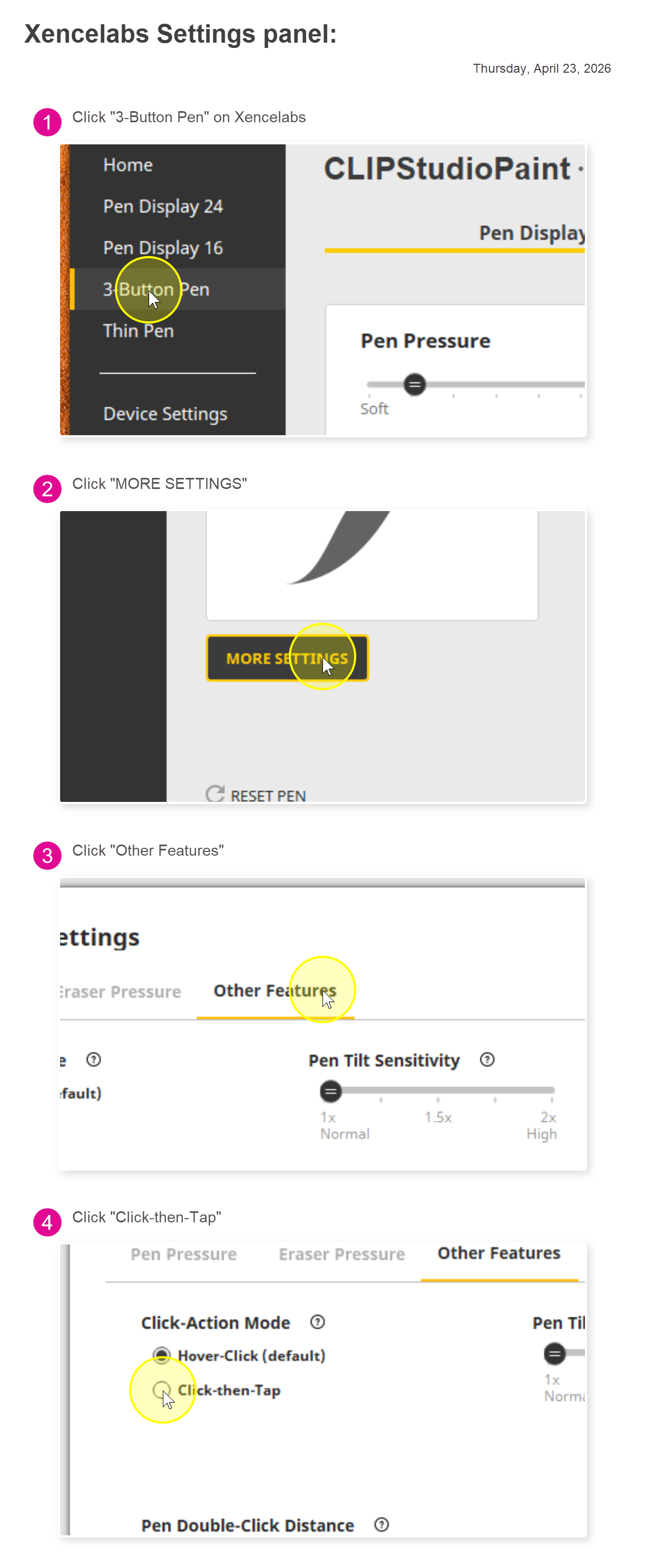
Thanks for the clarification. I'll send that on to the driver team to see if that can be looked at as a feature update.
Thank you for the request -
Thank you.
Jeffrey Sousa
I'd like to engage a modifier when specifically touching the tablet with my pen while dragging vs hover dragging.
This actually works out of the box with DaVinci Resolve, where if you hold middle-click (I use the lower side button on the pen for this) and hover drag the image, you pan around it freely. But if you keep that side button (middle mouse) pressed and actually bear down on the tablet and drag, you now zoom in and out.
It's a dynamic and useful distinction.
I'm now working in Baselight, and while middle mouse + drag also pans there, pressing down on the tablet (applying some pressure input) doesn't change that.
To zoom in Baselight, you need to hold command while dragging.
So I'd like to program my Xencelabs tablet to consider a press + drag to equal command+drag.
I'm pretty sure there are many other useful applications for this.